Tech Support Scams: 7 Mistakes That Invite Remote Access
Scammers rely on your willingness to bypass security controls, not your technical ignorance, to install malware and steal credentials from your device.

Tech support scams succeed when you grant remote control, pay via irreversible methods, or trust unsolicited alerts. Fix this by disabling remote management tools, ignoring pop-ups, and verifying contact details through official channels before sharing access.
Mistake 1: Trusting Unsolicited Security Alerts
Why it hurts:
Pop-up windows claiming your device is infected are browser-based tricks. They do not reflect the actual state of your operating system. These alerts exploit urgency. You feel pressured to act before thinking. The alert displays a fake phone number. Calling it connects you to a scammer. The scammer then uses social engineering to convince you to install malicious software. The alert itself is harmless code. The danger lies in your reaction to it. You abandon standard safety protocols because the message feels authoritative.
The fix:
Close the browser tab immediately. Do not click any buttons inside the pop-up. Do not call the number displayed. If you are unsure whether an alert is real, open a new browser window. Navigate to your antivirus vendor’s official website manually. Check their status page. Real security software updates silently in the background. It does not interrupt your work with loud warnings. Understanding how browser notifications work helps you recognize these fakes. This knowledge protects you from the initial hook of social engineering attacks.
Mistake 2: Granting Remote Desktop Access
Why it hurts:
Scammers ask you to install remote management software like AnyDesk or TeamViewer. They claim this lets them "fix" the fake infection. In reality, it gives them full control of your mouse, keyboard, and screen. They can move your mouse cursor to hide their actions. They can open banking apps while you watch a distraction video. They can install keyloggers to capture passwords. They can access your personal files. The tool itself is legitimate software. The intent behind its use is criminal. You hand over the keys to your digital house. You cannot see what they are doing behind the scenes.
The fix:
Never install remote access tools unless you initiated the contact. If a company contacts you, they will have existing support channels. They will not ask you to download new software. Disable remote management features in your operating system settings when not in use. Most modern systems allow you to turn off remote assistance. This reduces the attack surface. If you must use remote tools for work, ensure they require multi-factor authentication. This adds a layer of security against unauthorized access. It ensures only verified users can connect to your machine.
Mistake 3: Paying for Non-Existent Repairs
Why it hurts:
Scammers demand payment for services they did not perform. They often request payment via gift cards, cryptocurrency, or wire transfers. These methods are irreversible. Once you send the code or funds, it is gone. There is no chargeback process. No customer service can help you recover the money. The scammer has no intention of fixing anything. The payment is the goal. They may threaten legal action or claim you owe more. They exploit your fear of losing money already spent. You pay to make the problem go away. The problem was never real.
The fix:
Refuse to pay for any service initiated by a cold call or pop-up. Legitimate businesses invoice you after work is completed. They use traceable payment methods. They provide receipts and support history. If you have already paid, contact your bank immediately. Report the transaction as fraudulent. While recovery is unlikely, it may stop further charges. Document every interaction. Save chat logs and call records. This evidence helps law enforcement. Do not engage further with the scammer. They will only try to extract more money.
Mistake 4: Sharing Authentication Credentials
Why it hurts:
Scammers ask for your login passwords, PINs, or security codes. They claim this is needed to "verify" your identity or access your account. Real support staff never ask for your primary password. They may ask for partial information for verification. They never need your full credentials. Giving them access allows them to hijack your accounts. They can change passwords to lock you out. They can access financial data. They can impersonate you to friends and family. This is a form of credential theft. It bypasses the security you built into your accounts. You become the weak link in the chain.
The fix:
Never share your password with anyone. Use a password manager to generate unique, complex passwords for each account. Enable multi-factor authentication on all critical accounts. This ensures that even if a password is stolen, the attacker cannot log in. If support needs access, use a temporary, limited-access account. Revoke this access immediately after the session. Review your account activity regularly. Look for logins from unknown locations. Change passwords if you suspect a breach. This limits the damage of any potential exposure.
Mistake 5: Disabling Security Software
Why it hurts:
Scammers instruct you to disable your firewall or antivirus. They claim this prevents "conflicts" with their repair tool. This removes your primary defense against malware. With protections down, they can install ransomware or spyware. Your device becomes vulnerable to other attacks. The scammer has a free path to compromise your system. You are trusting a stranger to protect your data. They have no incentive to do so. You are effectively turning off your alarms while a burglar is inside. This step is critical for their success. It is never necessary for legitimate support.
The fix:
Keep your security software active at all times. If a technician needs to troubleshoot, they will work within the constraints of your security. They will not ask you to disable protections. If they do, end the session. Update your antivirus definitions regularly. Ensure your operating system is patched. These updates fix known vulnerabilities. They reduce the risk of exploitation. Do not let anyone talk you out of your security settings. Your safety depends on these tools working correctly.
See also: Detect Gift Card Scams in Logs and User Behavior
Mistake 6: Ignoring Caller ID Spoofing
Why it hurts:
Scammers use caller ID spoofing to display trusted numbers. You may see a local area code or a known company number. This creates a false sense of security. You assume the caller is legitimate. You lower your guard. You are more likely to comply with requests. The number is fake. It is generated by software. It does not reflect the caller’s true identity. This technique exploits your trust in familiar brands. It makes verification difficult. You need to verify the caller’s identity independently. Do not trust the number on your screen.
The fix:
Hang up on unsolicited calls. Call the official support number yourself. Use the number from the company’s website or your bill. Do not use the number provided by the caller. This ensures you are speaking to a real representative. Verify the caller’s identity before sharing any information. Ask for their name and employee ID. Look up the ID on the company’s website. This extra step prevents many scams. It breaks the scammer’s chain of deception.
Mistake 7: Failing to Verify Identity
Why it hurts:
You assume the caller is who they say they are. You do not check their credentials. You rely on their confidence and urgency. This is a classic social engineering tactic. They build rapport quickly. They create a crisis scenario. You focus on solving the problem. You forget to verify the source. This oversight allows them to manipulate you. They gain access to your system. They steal your data. The lack of verification is the root cause. You need to establish trust before taking action.
The fix:
Always verify the identity of anyone claiming to be support. Ask specific questions only a real employee would know. Check their credentials against official records. Do not rush the verification process. Take your time. If they pressure you, that is a red flag. Legitimate support staff will respect your need to verify. They will not threaten you. They will not hang up if you take a moment to check. This discipline protects you from deception.
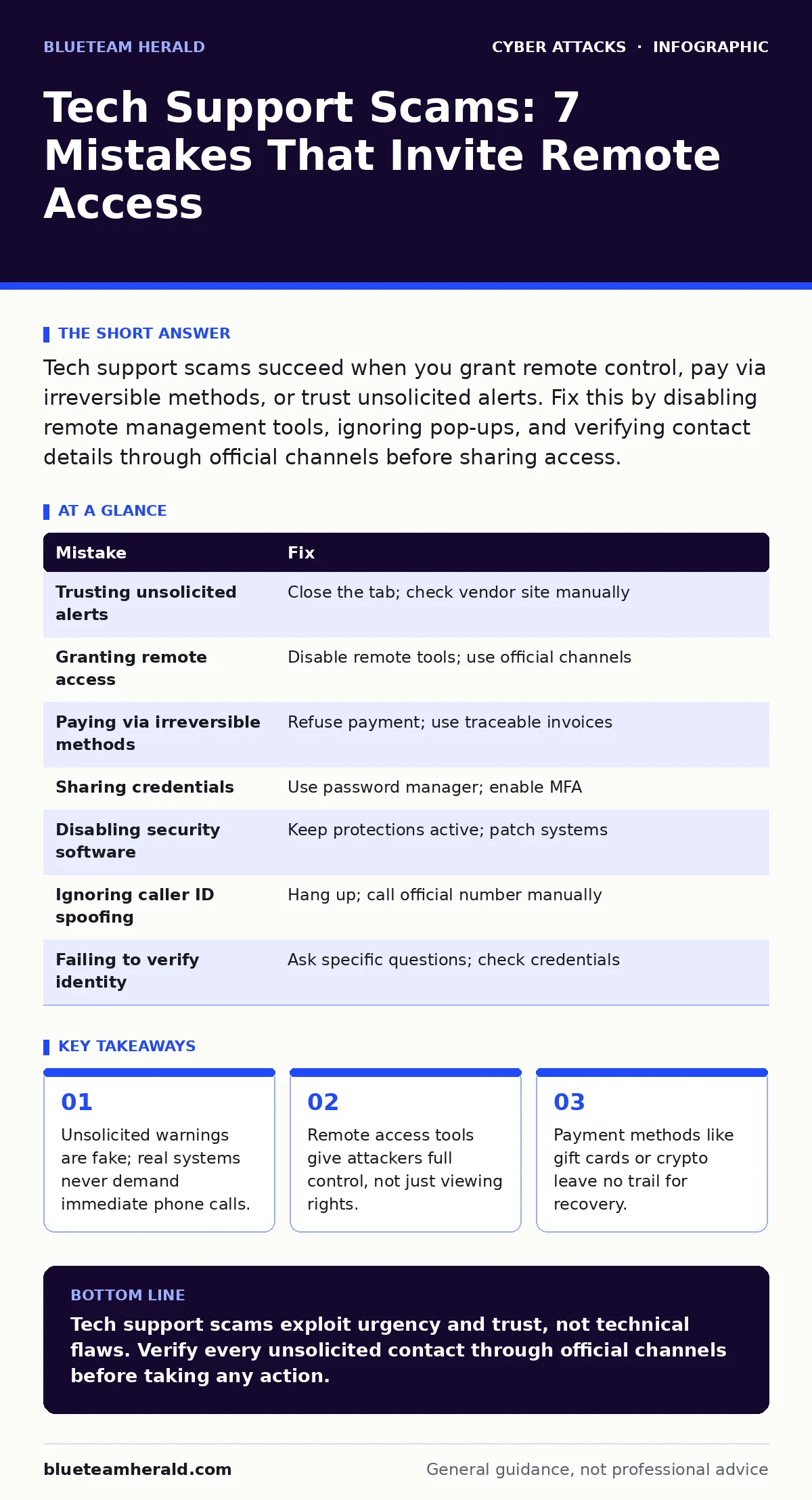
| Mistake | Fix |
|---|---|
| Trusting unsolicited alerts | Close the tab; check vendor site manually |
| Granting remote access | Disable remote tools; use official channels |
| Paying via irreversible methods | Refuse payment; use traceable invoices |
| Sharing credentials | Use password manager; enable MFA |
| Disabling security software | Keep protections active; patch systems |
| Ignoring caller ID spoofing | Hang up; call official number manually |
| Failing to verify identity | Ask specific questions; check credentials |
Key takeaways
- Unsolicited warnings are fake; real systems never demand immediate phone calls.
- Remote access tools give attackers full control, not just viewing rights.
- Payment methods like gift cards or crypto leave no trail for recovery.
Tech support scams exploit urgency and trust, not technical flaws. Verify every unsolicited contact through official channels before taking any action.
Frequently asked questions
How do I know if a tech support call is real?
Hang up and call the official support number found on the company's website or your bill. Legitimate companies do not initiate contact via unsolicited calls for billing or technical issues.
What should I do if I already shared my password?
Change your password immediately on a different device if possible. Enable multi-factor authentication. Contact your bank if financial accounts were accessed. Monitor your accounts for suspicious activity.
Can remote desktop software be used safely?
Yes, but only when you initiate the connection for a known purpose. Use reputable software that requires multi-factor authentication. Disable remote access features when not in use to reduce risk.
Why do scammers use gift cards for payment?
Gift cards are untraceable and irreversible. Once you provide the code, the scammer can redeem it instantly. There is no way to cancel the transaction or recover the funds.
How this guide was produced: written by the BlueTeam Herald editorial team with AI assistance, checked against the public references listed below, and reviewed when the facts change. See our editorial policy or report an error.