Digital Forensics Best Practices for Reliable Evidence Collection
Preserve data integrity and chain of custody to ensure digital evidence holds up during investigations and legal proceedings.

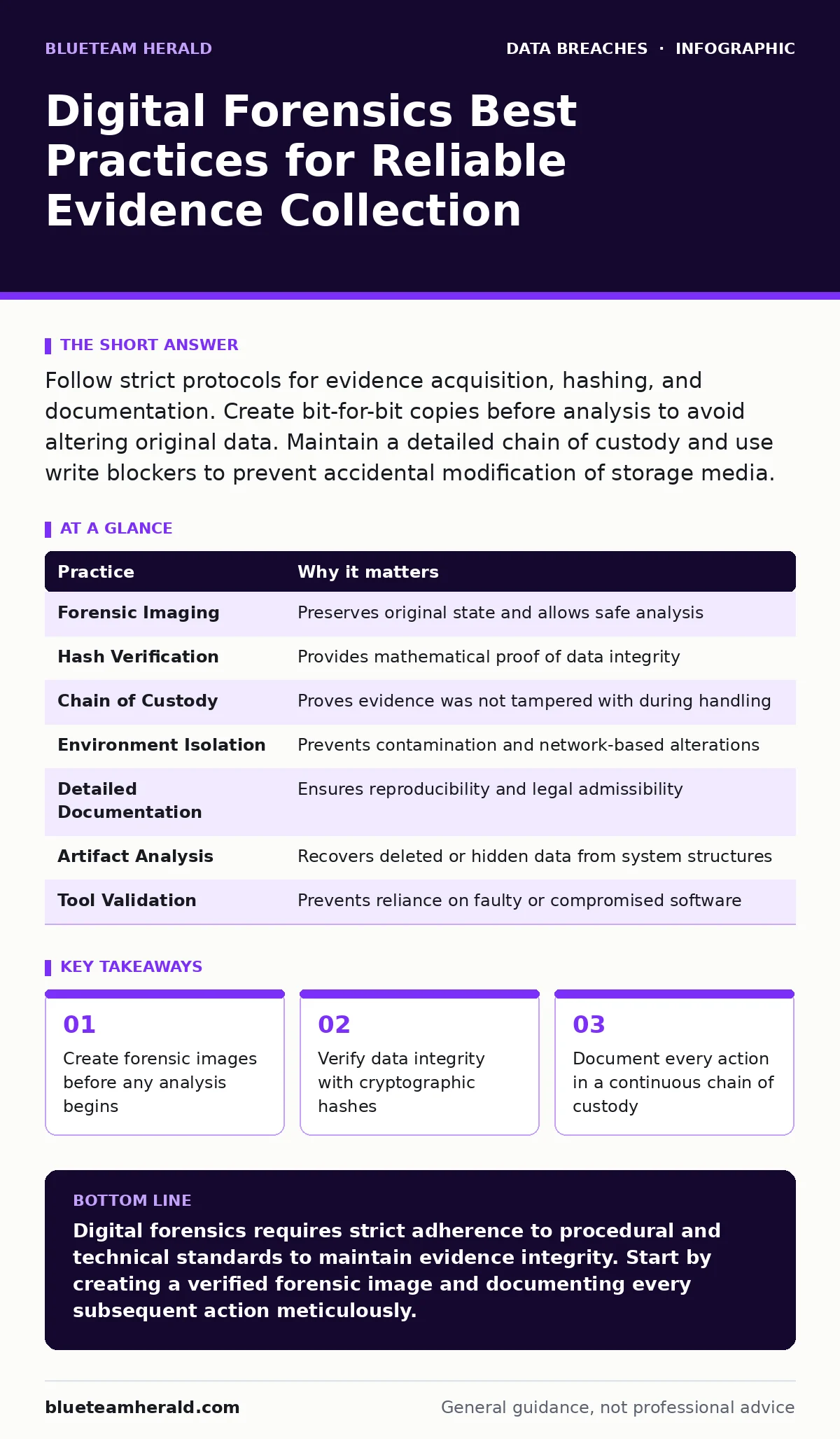
Follow strict protocols for evidence acquisition, hashing, and documentation. Create bit-for-bit copies before analysis to avoid altering original data. Maintain a detailed chain of custody and use write blockers to prevent accidental modification of storage media.
The Primacy of Forensic Imaging
You cannot analyze digital evidence without first preserving it. Direct interaction with a suspect’s drive alters file system metadata, such as access times and last-modified stamps. This modification destroys the original state of the evidence, rendering it legally questionable and scientifically unreliable.
The standard procedure is to create a forensic image. This is a bit-for-bit copy of the storage medium, including unallocated space and slack space. By working on this copy, you leave the original media untouched. If an error occurs during analysis, you can always return to the pristine original.
Imagine you plug a USB drive directly into your workstation to check for malware. Your operating system immediately creates temporary files, updates access logs, and potentially mounts the drive with write permissions. You have now altered the evidence before you even looked at it. The forensic image prevents this contamination.
Verifying Integrity with Hashing
Once you create an image, you must prove it matches the source exactly. You do this by generating a cryptographic hash. A hash is a fixed-length string of characters derived from the data using a mathematical algorithm. Even a single bit change in the source produces a completely different hash.
Calculate the hash of the original media before imaging. Then calculate the hash of the resulting image file. If the two hashes match, you have mathematical proof of fidelity. Common algorithms include SHA-256 and MD5, though SHA-256 is preferred for its resistance to collision attacks.
Record these hashes in your documentation immediately. This record serves as the baseline for the entire investigation. Any future reference to the evidence ties back to these specific values. If the hashes do not match, you must discard the image and start over.
Maintaining Chain of Custody
Evidence is only as strong as the record of who handled it. Chain of custody is the chronological documentation of the seizure, handling, and transfer of physical or digital evidence. Gaps in this record allow adversaries to claim tampering or substitution.
Every person who touches the evidence must log their name, role, and the time of transfer. Include the reason for the transfer and the condition of the evidence at that moment. Use tamper-evident seals on physical containers and digital signatures on log entries if possible.
Do not rely on memory or informal notes. Use standardized forms or dedicated case management software. Consistency is key. A broken chain does not necessarily invalidate evidence, but it weakens its credibility and invites challenges during review or litigation.
Isolating the Environment
Your analysis environment must be separate from production networks. Connecting a suspect machine to your corporate network can trigger automated responses. These responses might wipe data, alert the suspect, or spread malware to your systems.
Use a dedicated forensic workstation. This machine should have no access to the internet unless specifically required for lookups, and even then, through a controlled gateway. Isolate the suspect device from any network interfaces. Disable Wi-Fi and Bluetooth radios before powering it on.
Physical isolation is the safest approach. If you must analyze a live system, use a Faraday bag to block wireless signals. This prevents remote wiping commands or data exfiltration. It also ensures that your analysis tools do not inadvertently communicate with external servers.
Documenting Every Action
Forensics is a scientific process that requires reproducibility. Another investigator must be able to follow your steps and reach the same conclusions. Detailed documentation is not optional; it is the foundation of admissibility.
Log every command you run, every file you open, and every tool you use. Include timestamps and version numbers. Note any anomalies or unexpected behaviors. If you skip a step or encounter an error, record that too. Omissions look like obfuscation.
Use a dedicated lab notebook or digital log. Do not mix personal notes with official records. Your documentation should tell the story of the investigation clearly and chronologically. Ambiguity in notes leads to ambiguity in findings.
See also: DNS Rebinding Response: Containment, Recovery and Prevention Steps · Ivanti VPN Warning Signs: Detecting Silent Exploitation
Understanding File System Artifacts
Digital evidence often lives in the gaps between files. The file system maintains metadata that persists even after deletion. Understanding how the operating system structures data allows you to recover information that appears gone.
On NTFS volumes, the Master File Table contains records for every file. These records persist even if the file is deleted from the directory structure. You can recover names, sizes, and timestamps from these residual entries. Similar mechanisms exist in ext4 and APFS.
Look for slack space, the unused portion of a cluster after a file. Data written here may contain fragments of previous files. Unallocated space may hold deleted files that have not yet been overwritten. These artifacts provide context that active files cannot.
Validating Tool Outputs
Forensic tools are software, and software contains bugs. Relying blindly on automated results introduces risk. You must verify the output of your tools against known standards or manual checks.
If a tool claims to find a specific file, manually inspect the raw image data at the reported offset. Confirm that the file header and footer match the expected format. Cross-reference findings with multiple tools when possible.
Stay updated on tool vulnerabilities. A compromised forensic tool can insert false evidence or hide real evidence. Use open-source tools where possible, as their code can be audited. Document the version and configuration of every tool used.
| Practice | Why it matters |
|---|---|
| Forensic Imaging | Preserves original state and allows safe analysis |
| Hash Verification | Provides mathematical proof of data integrity |
| Chain of Custody | Proves evidence was not tampered with during handling |
| Environment Isolation | Prevents contamination and network-based alterations |
| Detailed Documentation | Ensures reproducibility and legal admissibility |
| Artifact Analysis | Recovers deleted or hidden data from system structures |
| Tool Validation | Prevents reliance on faulty or compromised software |
Key takeaways
- Create forensic images before any analysis begins
- Verify data integrity with cryptographic hashes
- Document every action in a continuous chain of custody
- Use write blockers when connecting physical media
Digital forensics requires strict adherence to procedural and technical standards to maintain evidence integrity. Start by creating a verified forensic image and documenting every subsequent action meticulously.
Frequently asked questions
Can I use a standard external hard drive to clone a suspect drive?
No, you must use a write blocker. Standard connections allow your OS to write metadata to the source drive, altering the evidence and compromising its integrity.
How long should I keep forensic images and logs?
Retention periods vary by jurisdiction and organizational policy. Keep them for at least as long as the maximum statute of limitations for relevant crimes, plus a buffer period for appeals.
Is it legal to analyze evidence from a cloud account?
Cloud forensics requires explicit legal authority and cooperation from the provider. You cannot simply log in and copy data without proper warrants or consent, as this violates privacy laws.
What if I accidentally modify the evidence?
Stop immediately. Document the error in detail. Do not attempt to hide the modification. Consult with legal counsel and potentially restart the acquisition process from the original media if possible.
How this guide was produced: written by the BlueTeam Herald editorial team with AI assistance, checked against the public references listed below, and reviewed when the facts change. See our editorial policy or report an error.