How to Stop Exposed Docker APIs and Prevent Remote Access
Binding the Docker daemon to 0.0.0.0 grants root-equivalent control over the host, allowing attackers to escape containers and compromise the entire infrastructure.
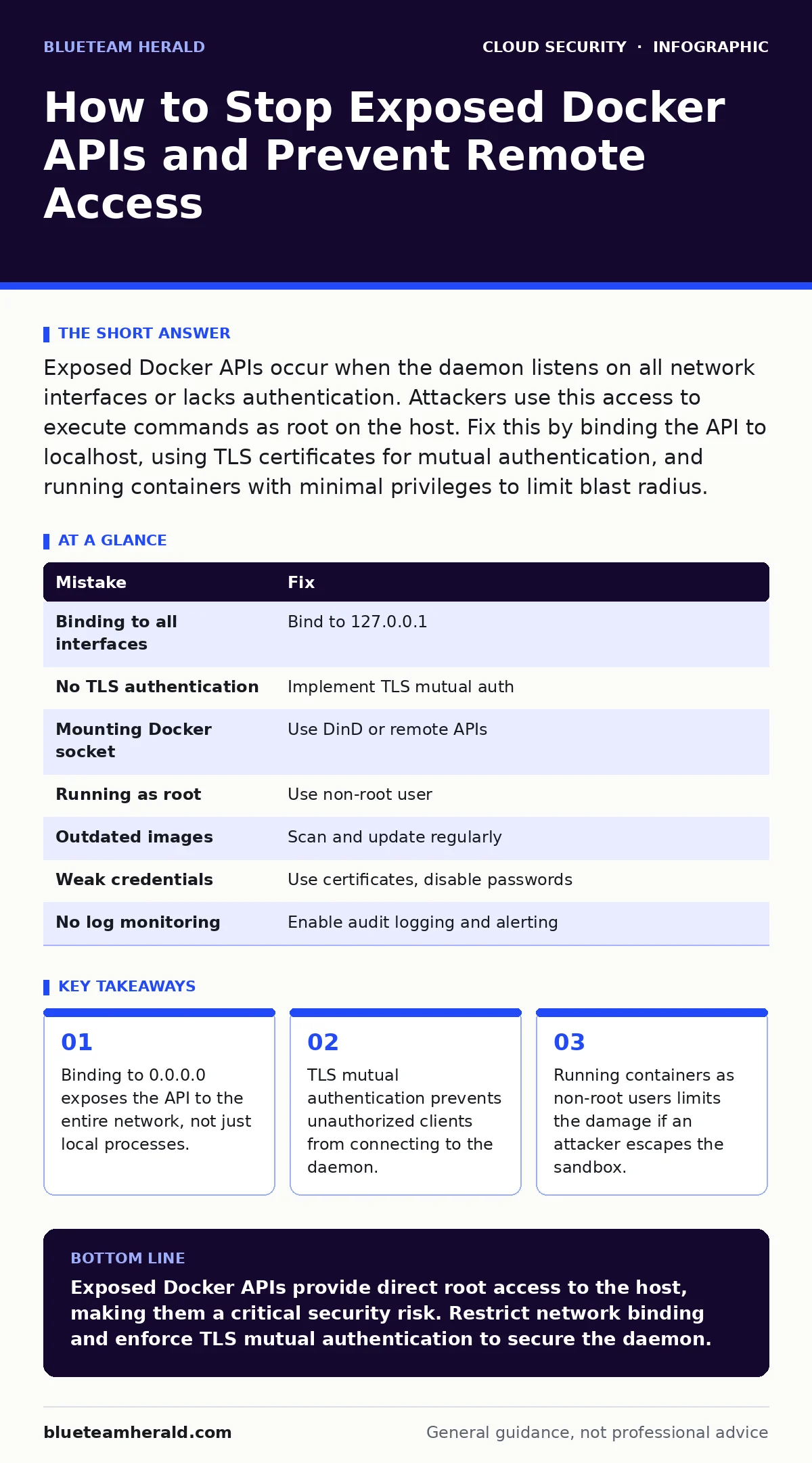
Exposed Docker APIs occur when the daemon listens on all network interfaces or lacks authentication. Attackers use this access to execute commands as root on the host. Fix this by binding the API to localhost, using TLS certificates for mutual authentication, and running containers with minimal privileges to limit blast radius.
Mistake 1: Binding the Daemon to All Interfaces
Why it hurts:
Docker binds to localhost by default for security. Changing this configuration to listen on 0.0.0.0 exposes the API to every device on the local network and potentially the internet. This removes the network boundary that protects the daemon. An attacker scanning for open ports finds the Docker API immediately. They gain direct access to the container management interface without needing to exploit application vulnerabilities. This exposure allows remote execution of commands on the host system.
The fix:
Configure the daemon to listen only on the loopback interface. Edit the daemon configuration file to specify "127.0.0.1" instead of "0.0.0.0". This ensures that only processes running on the same machine can communicate with the Docker daemon. External connections are dropped at the network layer. Verify the binding by checking which ports are listening and confirming the address is restricted to the local host.
Mistake 2: Omitting TLS Mutual Authentication
Why it hurts:
Without Transport Layer Security, data sent to the Docker API travels in plaintext. An attacker on the same network can intercept these requests using packet sniffing tools. They can observe container creation, image pulls, and configuration changes. More dangerously, they can inject malicious commands into the stream. Mutual authentication requires both the client and the server to present valid certificates. Skipping this step allows anyone who can reach the port to issue commands, assuming they know the endpoint. This creates a wide attack surface for man-in-the-middle attacks.
The fix:
Generate a Certificate Authority key and certificate. Create server and client certificates signed by this authority. Configure the Docker daemon to require TLS and specify the paths to the CA, server certificate, and server key. Clients must present their client certificate to connect. This establishes a secure channel where both parties verify each other's identity. Unauthorized clients without valid certificates are rejected before any API call is processed.
Mistake 3: Mounting the Docker Socket Inside Containers
Why it hurts:
Developers often mount the host's Docker socket into a container to enable container management from within. This grants the container full access to the Docker API on the host. If an attacker compromises the container, they gain the same privileges as the Docker daemon. This effectively bypasses container isolation. The attacker can create new containers, read secrets, or write files to the host filesystem. This mistake turns a contained vulnerability into a full host compromise. It is a common path for cloud privilege escalation in multi-tenant environments.
The fix:
Avoid mounting the Docker socket whenever possible. Use remote Docker APIs with strict TLS authentication instead. If socket access is unavoidable, run the container with read-only access to the socket. Use tools like DinD or DooD to create nested container environments that do not require host socket access. These alternatives provide the needed functionality without exposing the host's primary daemon. This reduces the risk of container breakout significantly.
Mistake 4: Running Containers as Root User
Why it hurts:
By default, many images run processes as the root user. If an attacker exploits a vulnerability in the application, they execute code with root privileges inside the container. While the container is isolated, kernel vulnerabilities or misconfigured mounts can allow escape. Running as root increases the impact of such escapes. The attacker gains root access on the host system. This violates the principle of least privilege. It gives unnecessary power to processes that only need basic execution rights.
The fix:
Specify a non-root user in the Dockerfile using the USER instruction. Create a dedicated user with minimal permissions for the application. Ensure that file permissions inside the image match this user's requirements. This limits the scope of damage if the container is compromised. The attacker remains confined to the non-root user's capabilities. Combine this with read-only filesystems where possible to further restrict write access.
Mistake 5: Ignoring Image Vulnerabilities and Updates
Why it hurts:
Base images contain system libraries and dependencies. These components often have known security flaws. Using outdated images introduces these vulnerabilities into your deployment. Attackers scan for public images with known exploits. They target running containers that match these profiles. An unpatched image provides a ready-made entry point. Even if the API is secure, a vulnerable application inside the container can be exploited. This leads to code execution within the container, which can escalate to the host if other mistakes are present.
The fix:
Regularly scan images for known vulnerabilities using automated tools. Update base images to their latest secure versions. Pin images to specific versions or SHA256 digests to prevent supply chain attacks. Implement a policy to rebuild and redeploy containers when critical updates are released. This reduces the window of exposure to known exploits. Combine this with cloud-native application protection platforms (CNAPP) to monitor for runtime anomalies.
Mistake 6: Using Default or Weak Credentials
Why it hurts:
Some Docker setups allow username and password authentication for the API. Using default credentials or weak passwords makes brute-force attacks trivial. Attackers use automated tools to guess common passwords. Once authenticated, they have full control over the daemon. This is similar to leaving a door unlocked. It ignores the security provided by network restrictions. Even if the API is bound to localhost, local attackers or compromised services can use these credentials. This bypasses any complexity in the authentication mechanism.
The fix:
Disable password-based authentication for the Docker API. Rely on TLS mutual authentication with certificates instead. Certificates are harder to steal and brute-force than passwords. If legacy systems require password access, use complex, randomly generated passwords. Store these credentials in a secure secrets manager. Rotate them regularly. This adds a layer of defense against credential stuffing and brute-force attempts.
Mistake 7: Failing to Monitor API Access Logs
Why it hurts:
Docker generates logs for API requests. Ignoring these logs leaves you blind to unauthorized access attempts. Attackers may probe the API to test for vulnerabilities. They may attempt to list containers or pull images. Without monitoring, these activities go unnoticed until a breach occurs. Early detection allows you to respond before significant damage happens. Lack of visibility prevents forensic analysis after an incident. You cannot defend what you cannot see.
The fix:
Enable audit logging for the Docker daemon. Forward these logs to a centralized logging system. Set up alerts for suspicious activities, such as frequent failed authentication attempts or unusual container creations. Use cloud detection and response tools to correlate these logs with other security events. This provides a comprehensive view of API usage. It helps identify compromised credentials or misconfigurations quickly.
| Mistake | Fix |
|---|---|
| Binding to all interfaces | Bind to 127.0.0.1 |
| No TLS authentication | Implement TLS mutual auth |
| Mounting Docker socket | Use DinD or remote APIs |
| Running as root | Use non-root user |
| Outdated images | Scan and update regularly |
| Weak credentials | Use certificates, disable passwords |
| No log monitoring | Enable audit logging and alerting |
Key takeaways
- Binding to 0.0.0.0 exposes the API to the entire network, not just local processes.
- TLS mutual authentication prevents unauthorized clients from connecting to the daemon.
- Running containers as non-root users limits the damage if an attacker escapes the sandbox.
Exposed Docker APIs provide direct root access to the host, making them a critical security risk. Restrict network binding and enforce TLS mutual authentication to secure the daemon.
Frequently asked questions
Can Docker API exposure lead to cryptocurrency mining?
Yes, attackers often use compromised hosts to run cryptocurrency mining containers. This consumes host resources and increases electricity costs.
Is localhost binding enough for production environments?
Localhost binding protects against external network attacks but not local threats. Combine it with TLS and least privilege for full protection.
How do I detect if my Docker API is exposed?
Scan your network for open Docker ports. Check if the daemon listens on 0.0.0.0. Monitor logs for unexpected API requests.
Does Kubernetes change Docker API security?
Kubernetes uses container runtimes that may expose similar APIs. Security principles remain the same: restrict access and use authentication.
How this guide was produced: written by the BlueTeam Herald editorial team with AI assistance, checked against the public references listed below, and reviewed when the facts change. See our editorial policy or report an error.