Smishing Response: Immediate Steps to Contain and Recover
Changing passwords alone fails to stop smishing damage because attackers often install persistent malware that survives credential resets and continues to harvest data.
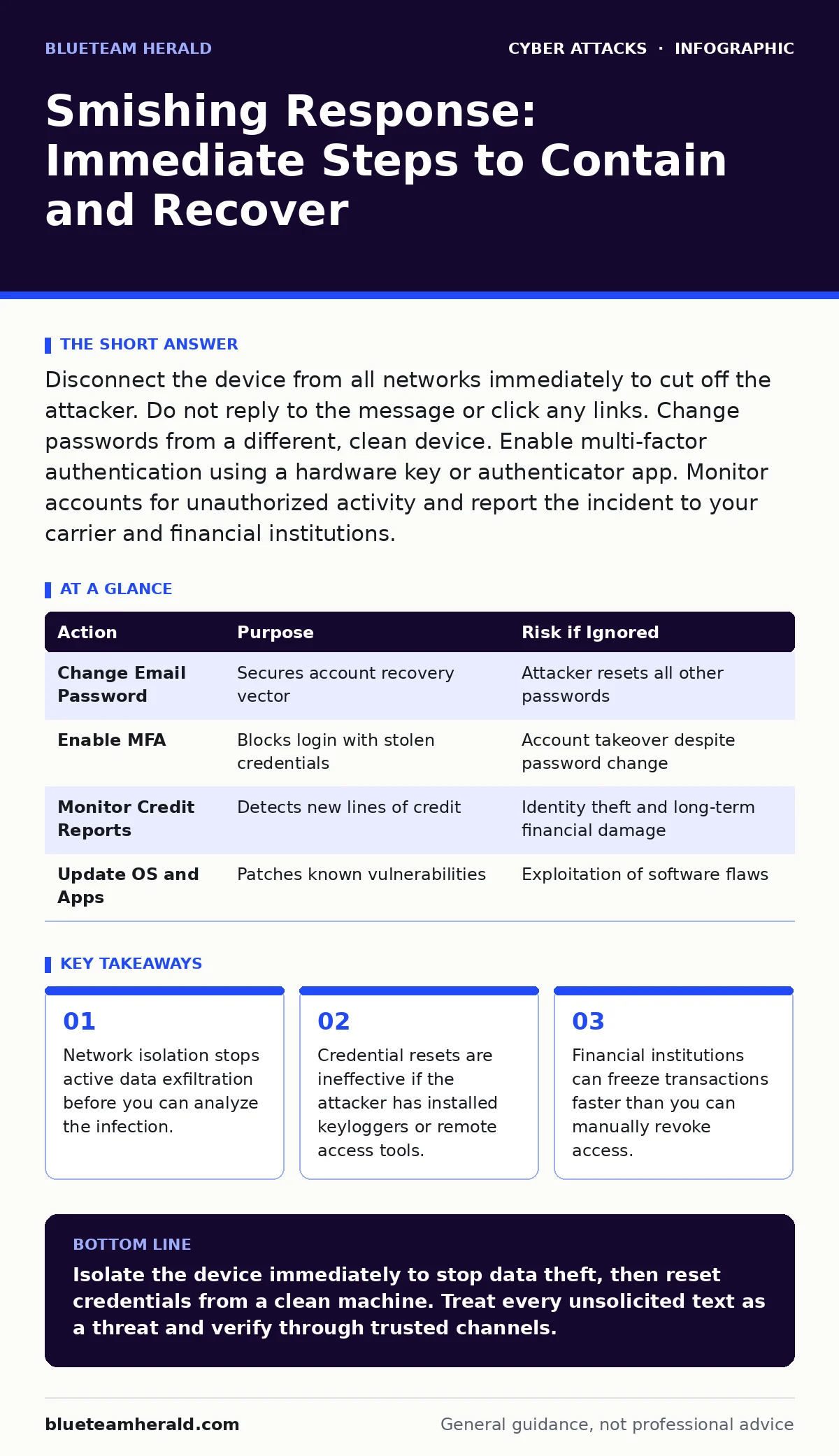
Disconnect the device from all networks immediately to cut off the attacker. Do not reply to the message or click any links. Change passwords from a different, clean device. Enable multi-factor authentication using a hardware key or authenticator app. Monitor accounts for unauthorized activity and report the incident to your carrier and financial institutions.
First hour
Smishing, or SMS phishing, uses text messages to trick you into handing over credentials or installing malware. The damage often occurs before you realize you have been targeted. Attackers exploit the trust people place in short, urgent messages.
Your first priority is isolation. If you clicked a link or downloaded an attachment, the device may already be compromised. You must stop the device from communicating with the attacker’s command and control servers. Turn off Wi-Fi and mobile data immediately. Do not just put the phone in airplane mode if you suspect a sophisticated agent that might use other channels, though airplane mode is a good start. Physically disconnecting the network interface is the only way to guarantee no data leaves the device.
- Disable Wi-Fi and mobile data immediately.
- Do not reply to the sender or call the number in the message.
- Do not open any other apps that might trigger the malware.
- Note the sender’s number and the exact text of the message.
Imagine you received a text claiming your package delivery failed. You clicked the link, entered your address, and the site asked for your bank details. If you entered them, the attacker has your credentials. If you downloaded an APK file on Android, you likely installed spyware. The clock is ticking. Every second the device is online, the attacker can steal contacts, messages, and session tokens.
First day
Once the device is isolated, you must assess the scope of the compromise. Do not use the compromised device to reset passwords. If malware is present, it can capture your new passwords as you type them. Use a clean computer or a different phone that has never touched the suspicious message.
Start with your most critical accounts. Email is the master key to your digital life. If an attacker controls your email, they can reset passwords for every other service. Change your email password from the clean device. Then, enable phishing-resistant authentication. This type of authentication, such as FIDO2 security keys or platform authenticators, prevents attackers from stealing your login credentials even if they have your password.
Next, address financial exposure. Contact your bank and credit card issuers. Tell them you suspect fraud. They can place temporary holds on transactions or issue new cards. This step is vital because many smishing attacks aim directly at financial data. The attacker may not need to hack your bank directly; they just need the credentials you handed over.
If you installed an app, uninstall it. On Android, check your installed apps list for anything unfamiliar. On iOS, the sandboxing makes standalone malware rarer, but credential theft via fake login pages is common. If you entered data on a fake site, the damage is done regardless of the OS.
First week
Recovery involves hardening your environment to prevent recurrence. You must review all accounts that shared the same password as your compromised email or banking app. Attackers often try the same credential pair on other services, a technique called credential stuffing. Change passwords for these accounts.
Consider the broader implications of data exposure. If you entered personal information, you are at higher risk for targeted social engineering. This is where the link to CEO fraud becomes relevant. Attackers use stolen personal data to craft convincing messages that appear to come from your boss or a trusted colleague. They know your name, your phone number, and possibly your recent activity.
Review your device’s permissions. Many apps request access to contacts, SMS, or location. Revoke permissions for apps that do not strictly need them. This limits the damage if an app is compromised in the future.
| Action | Purpose | Risk if Ignored |
|---|---|---|
| Change Email Password | Secures account recovery vector | Attacker resets all other passwords |
| Enable MFA | Blocks login with stolen credentials | Account takeover despite password change |
| Monitor Credit Reports | Detects new lines of credit | Identity theft and long-term financial damage |
| Update OS and Apps | Patches known vulnerabilities | Exploitation of software flaws |
Who to tell
Reporting the incident helps disrupt the attacker’s infrastructure and protects others. Contact your mobile carrier. They can block the sender’s number and may be able to trace the origin of the message. Carriers have tools to identify spam patterns and can shut down compromised numbers.
If you suffered financial loss, file a report with your local law enforcement agency. While individual cases are rarely solved, aggregated data helps authorities identify patterns. In some regions, you can also report to national cybercrime units. This creates a paper trail that may be needed for insurance claims or dispute resolution.
Tell your close contacts. If your messaging apps were compromised, the attacker may have sent messages to your friends and family, asking for money or sensitive information. A simple broadcast message warning them of the incident can prevent secondary attacks. This is similar to how angler phishing works, where attackers pose as customer support on social media. By warning your network, you reduce the attack surface for related scams.
How to stop a repeat
Prevention requires changing how you interact with unsolicited messages. Treat every text from an unknown number as hostile. Legitimate organizations rarely ask for sensitive information via SMS. If you receive a text about a bank issue, do not click the link. Open your banking app directly or call the number on the back of your card.
Implement a policy of verification. If a message claims to be from a known entity, verify it through a separate channel. Do not use the contact information in the suspicious message. Use a phone number or website you already trust. This breaks the attacker’s chain of trust.
Consider using a secondary number for public-facing interactions. This keeps your primary number private and reduces the likelihood of it being targeted. Some services allow you to generate disposable numbers for sign-ups. This limits the exposure of your real contact details.
Be aware that smishing is often part of a larger campaign. Attackers may use romance scams to build trust over weeks before asking for money or data. They may use slow, persistent communication to lower your guard. Recognizing these patterns early can help you identify smishing attempts before they cause damage.
Long-term hygiene
Your digital hygiene extends beyond passwords. Keep your operating system and apps updated. Developers release patches to fix vulnerabilities that attackers exploit. Ignoring updates leaves your device open to known exploits.
Review your app permissions regularly. An app that needs to send SMS messages but is just a flashlight tool is suspicious. Revoke unnecessary permissions. This limits the data an app can access if it is compromised.
Use a password manager. It generates unique, complex passwords for each site. If one site is breached, your other accounts remain safe. It also autofills credentials, reducing the chance of typing into a fake site.
Finally, educate yourself on the tactics used in phishing-resistant authentication. Understanding how these systems work helps you appreciate why they are superior to SMS-based codes. SMS codes can be intercepted via SIM swapping or malware. Hardware keys and authenticator apps are much harder to compromise.
Key takeaways
- Network isolation stops active data exfiltration before you can analyze the infection.
- Credential resets are ineffective if the attacker has installed keyloggers or remote access tools.
- Financial institutions can freeze transactions faster than you can manually revoke access.
Isolate the device immediately to stop data theft, then reset credentials from a clean machine. Treat every unsolicited text as a threat and verify through trusted channels.
Frequently asked questions
Can smishing hack my iPhone?
iOS is resistant to traditional malware, but smishing can still steal your credentials if you enter them on a fake website linked in the text.
Should I call the number in the smishing text?
No. Calling the number confirms your number is active and may connect you to a social engineer trying to extract more information.
How do I know if my phone has spyware?
Look for unusual battery drain, high data usage, or apps you do not recognize. However, modern spyware can be very subtle and hard to detect without specialized tools.
Is blocking the number enough?
Blocking stops future messages from that specific number, but it does not remove malware or revoke access to accounts you may have already compromised.
How this guide was produced: written by the BlueTeam Herald editorial team with AI assistance, checked against the public references listed below, and reviewed when the facts change. See our editorial policy or report an error.