7 npm Package Mistakes That Expose Your Codebase to Attacks
Most supply chain compromises stem from local dependency management errors rather than external exploits, making your lock files the primary defense line.

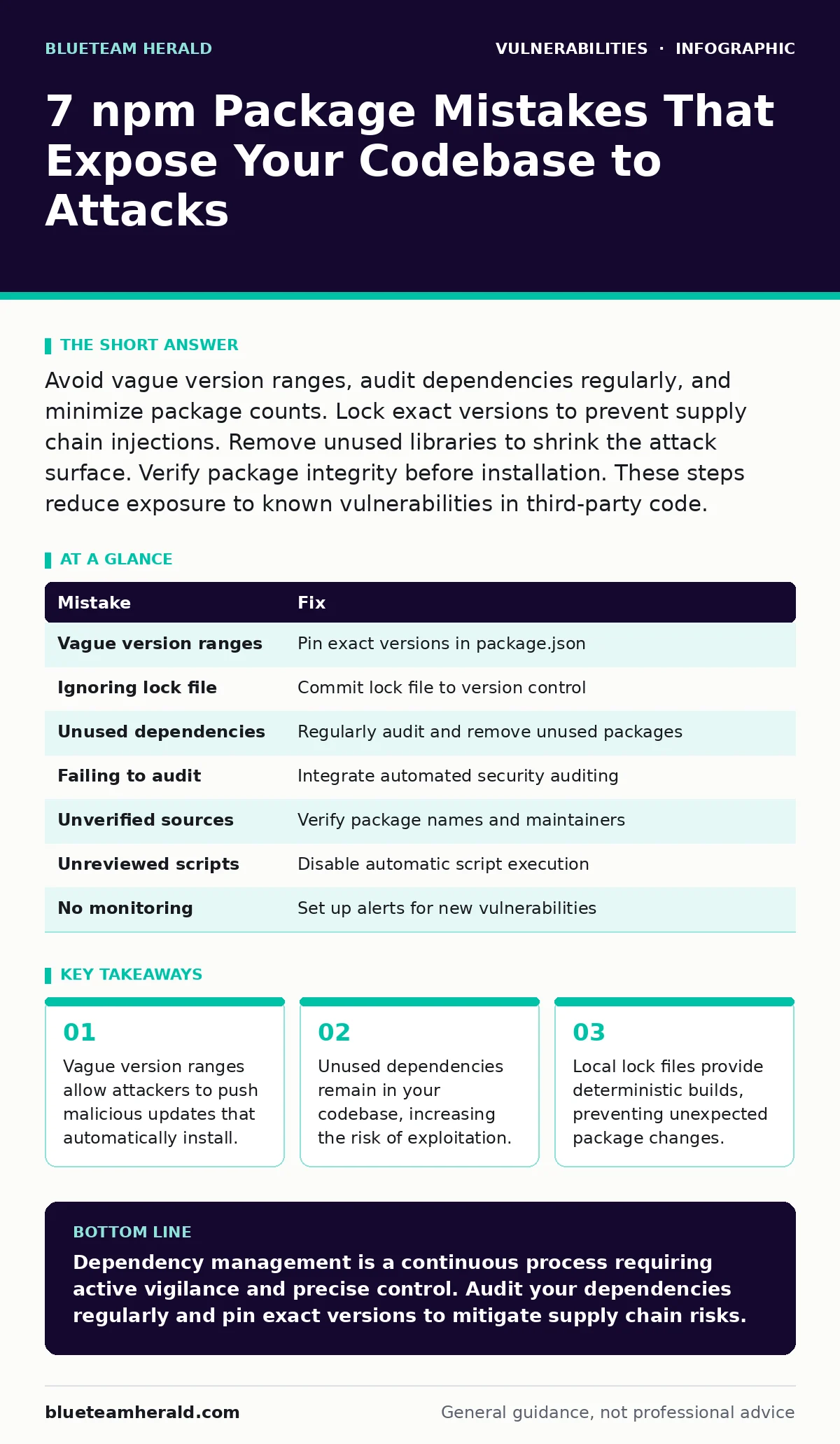
Avoid vague version ranges, audit dependencies regularly, and minimize package counts. Lock exact versions to prevent supply chain injections. Remove unused libraries to shrink the attack surface. Verify package integrity before installation. These steps reduce exposure to known vulnerabilities in third-party code.
Mistake 1: Using vague version ranges in package.json
Why it hurts:
Specifying ranges like ^1.0.0 allows npm to install any minor or patch update automatically. Attackers can compromise a package maintainer account and push a malicious update that fits within your specified range. Your next build pulls this compromised code without your explicit consent. This mechanism bypasses manual review processes entirely. The vulnerability exists in the trust model of semantic versioning. You assume minor updates are safe, but supply chain attacks often hide in these incremental changes. This mirrors the risk seen in authentication bypass vulnerabilities where trust assumptions fail.
The fix:
Pin exact versions in your package.json file whenever possible. Use the lock file to ensure reproducible builds. Configure your CI/CD pipeline to reject builds if the lock file changes unexpectedly. Review every dependency update manually before merging. This adds friction but prevents automatic installation of malicious code. Treat dependency updates as code changes requiring approval.
Mistake 2: Ignoring the lock file in version control
Why it hurts:
The lock file records the exact tree of installed dependencies. Without it, different developers or servers may install different versions of the same package. This inconsistency makes security audits unreliable. You cannot verify what code actually runs in production. An attacker could exploit a known vulnerability in a version that your lock file would have prevented. This lack of determinism is similar to security misconfigurations in server environments where settings drift over time. You lose the ability to reproduce and debug security issues accurately.
The fix:
Commit your lock file to version control. Treat it as a critical artifact of your build process. Ensure all team members use the same package manager version to avoid lock file format conflicts. Verify that your deployment process uses the lock file to install dependencies. This ensures consistency across all environments. Regular audits should check for lock file integrity.
Mistake 3: Leaving unused dependencies in your project
Why it hurts:
Every package you install increases your attack surface. Unused packages still execute code during installation and may run scripts at build time. They introduce vulnerabilities you do not need. Attackers scan for known vulnerabilities in popular packages. If you include a vulnerable package, even if unused, you are exposed. This is akin to leaving unnecessary ports open on a server. Reducing dependencies reduces the number of potential entry points. It also simplifies maintenance and reduces the time needed to apply patches.
The fix:
Regularly audit your dependencies. Use tools to identify unused packages. Remove them from your package.json and reinstall dependencies. Integrate dependency auditing into your development workflow. Make it a standard part of code reviews. This practice keeps your project lean and secure. It also reduces the complexity of your supply chain.
Mistake 4: Failing to audit dependencies for known vulnerabilities
Why it hurts:
New vulnerabilities are discovered constantly. Without regular audits, you remain exposed to known risks. Attackers exploit these known vulnerabilities because they are easy to find. This is similar to ignoring Patch Tuesday updates for operating systems. You leave known doors open for attackers. Automated tools can scan your dependencies against known vulnerability databases. This provides immediate visibility into your risk exposure. Ignoring these audits means you are flying blind regarding your security posture.
The fix:
Integrate automated security auditing into your CI/CD pipeline. Run audits on every pull request and merge. Block builds if critical vulnerabilities are detected. Review audit reports regularly and prioritize remediation based on severity. Subscribe to security advisories for your key dependencies. This proactive approach reduces the window of exposure.
Mistake 5: Trusting packages from unverified sources
Why it hurts:
Not all packages on public registries are vetted. Typosquatting attacks create packages with names similar to popular ones. Developers accidentally install these malicious packages. They may contain malware or backdoors. This is a common supply chain attack vector. Verifying the source and reputation of a package is critical. Check the maintainer’s history and community feedback. This diligence prevents accidental installation of harmful code. It mirrors the caution needed when evaluating cross-site scripting (XSS) risks in web applications.
The fix:
Verify package names and maintainers before installation. Use npm’s official registry and avoid third-party sources. Check for typos in package names. Review the package’s readme and documentation for legitimacy. Use package integrity checks to verify downloaded content. This extra step prevents many supply chain attacks.
Mistake 6: Running scripts from dependencies without review
Why it hurts:
npm packages can include scripts that run during installation. These scripts have full access to your system. Malicious scripts can steal credentials or install malware. This is a severe risk if you trust packages blindly. Reviewing package scripts is often overlooked but critical. This risk is similar to WebSocket vulnerabilities where unexpected data execution occurs. You must understand what code runs on your system. Blind trust in dependency scripts is dangerous.
The fix:
Disable automatic script execution in npm configurations. Review scripts manually before allowing them to run. Use containerized environments to isolate installation processes. This limits the impact of malicious scripts. Educate your team on the risks of dependency scripts. This awareness reduces the likelihood of accidental execution.
Mistake 7: Not monitoring for new vulnerabilities in dependencies
Why it hurts:
Vulnerabilities are discovered after packages are released. Without monitoring, you remain unaware of new risks. This is similar to not tracking CSAF security advisories for critical infrastructure. You miss critical updates that could protect your system. Active monitoring ensures you are aware of emerging threats. It allows you to respond quickly to new vulnerabilities. Passive reliance on initial audits is insufficient for long-term security.
The fix:
Set up alerts for new vulnerabilities in your dependencies. Use security advisories and community forums to stay informed. Regularly review and update your dependencies. This proactive monitoring reduces the risk of exploitation. It ensures you are aware of the latest security landscape.
| Mistake | Fix |
|---|---|
| Vague version ranges | Pin exact versions in package.json |
| Ignoring lock file | Commit lock file to version control |
| Unused dependencies | Regularly audit and remove unused packages |
| Failing to audit | Integrate automated security auditing |
| Unverified sources | Verify package names and maintainers |
| Unreviewed scripts | Disable automatic script execution |
| No monitoring | Set up alerts for new vulnerabilities |
Key takeaways
- Vague version ranges allow attackers to push malicious updates that automatically install.
- Unused dependencies remain in your codebase, increasing the risk of exploitation.
- Local lock files provide deterministic builds, preventing unexpected package changes.
Dependency management is a continuous process requiring active vigilance and precise control. Audit your dependencies regularly and pin exact versions to mitigate supply chain risks.
Frequently asked questions
How often should I audit npm dependencies?
Audit dependencies on every code commit and merge. Regular automated scans provide continuous protection against newly discovered vulnerabilities.
Can I trust packages from popular developers?
Popularity does not guarantee security. Even well-known packages can be compromised. Always verify integrity and monitor for advisories regardless of reputation.
What is typosquatting in npm?
Typosquatting involves creating packages with names similar to popular ones. Developers accidentally install these malicious packages. Verify package names carefully to avoid this trap.
Should I remove all optional dependencies?
Remove optional dependencies that are not strictly necessary. Each dependency increases your attack surface. Minimize your dependency tree to reduce risk exposure.
How this guide was produced: written by the BlueTeam Herald editorial team with AI assistance, checked against the public references listed below, and reviewed when the facts change. See our editorial policy or report an error.