What Is DLL Sideloading: How Attackers Hijack Legitimate Software
Attackers exploit the operating system's file search order to trick legitimate programs into loading malicious code instead of required libraries.
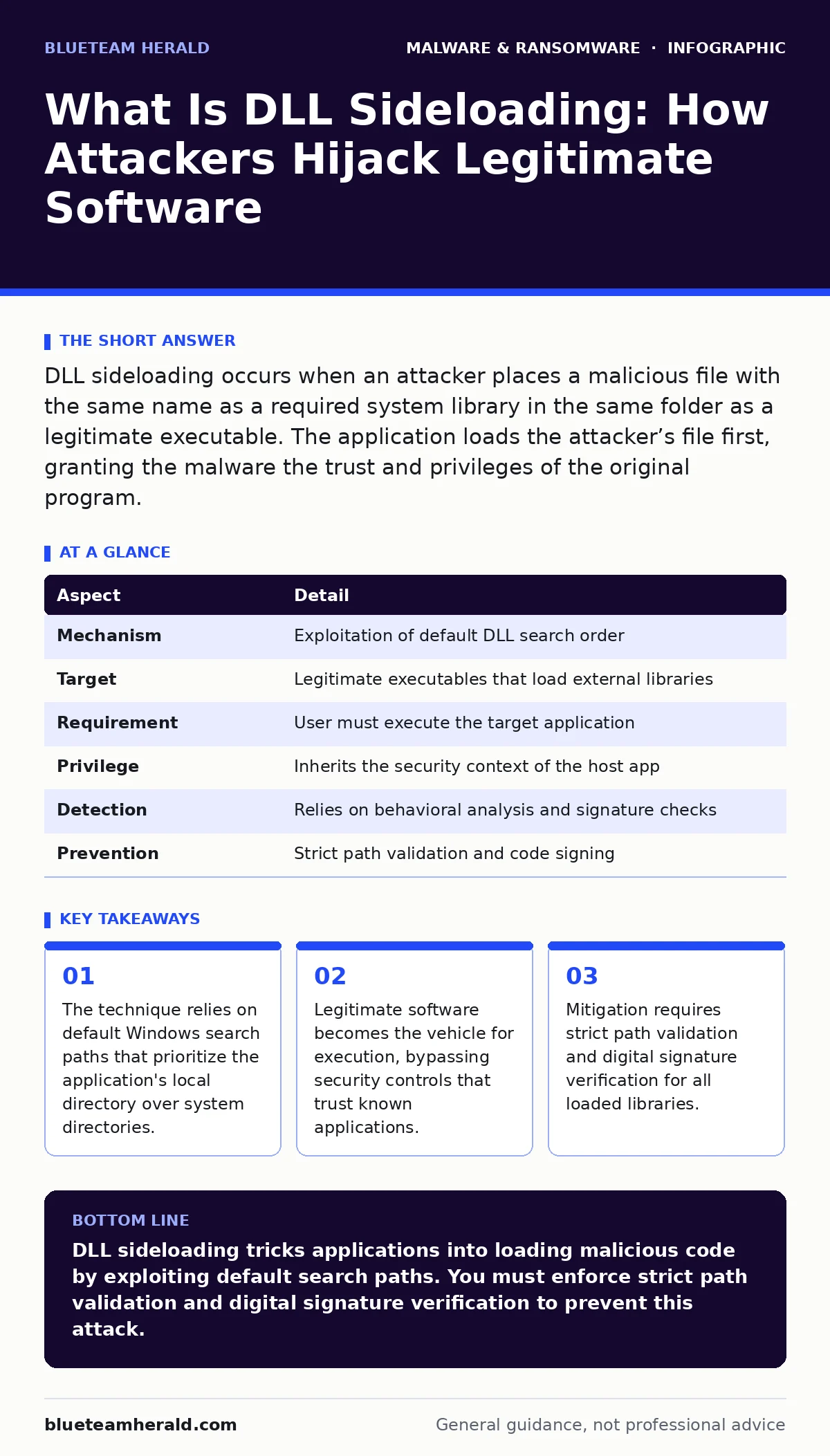
DLL sideloading occurs when an attacker places a malicious file with the same name as a required system library in the same folder as a legitimate executable. The application loads the attacker’s file first, granting the malware the trust and privileges of the original program.
The Library Analogy
Imagine you are building a house. You need a specific type of brick to complete the wall. You ask your supplier for "Red Brick A." The supplier delivers a box labeled "Red Brick A." You trust the supplier, so you do not inspect every brick individually. You place them in the wall. Later, you discover the box contained cement blocks painted red. The wall collapses because the material did not meet the structural requirements.
In computing, the executable program is the builder. The Dynamic Link Library (DLL) is the brick. The operating system is the supplier. When the program asks for a library, it expects a specific component. If an attacker places a fake component in the path where the program looks first, the program uses it. The program trusts the file because it is in the expected location.
What Is DLL Sideloading
What is DLL sideloading? It is a technique where an attacker places a malicious file with the same name as a legitimate library in the same directory as a target executable. When the user runs the legitimate executable, the operating system searches for the required library. It finds the malicious file first and loads it. The malicious code runs with the permissions of the legitimate application.
This method exploits the default search order of the Windows operating system. The system checks the directory containing the executable before checking the system directory. This design choice allows applications to bundle their own specific libraries. Attackers reverse this benefit. They create a folder, place the malicious DLL inside, and then place a copy of the legitimate executable next to it. They trick the user into running the executable.
At a Glance
| Aspect | Detail |
|---|---|
| Mechanism | Exploitation of default DLL search order |
| Target | Legitimate executables that load external libraries |
| Requirement | User must execute the target application |
| Privilege | Inherits the security context of the host app |
| Detection | Relies on behavioral analysis and signature checks |
| Prevention | Strict path validation and code signing |
How The Attack Unfolds
The attacker begins by identifying a legitimate application that loads unsigned or loosely verified DLLs. Many older or poorly coded applications do not specify the full path to their dependencies. They simply request the library by name. The attacker creates a malicious DLL with that exact name. This file contains the payload. It might be an infostealer designed to capture credentials or a downloader that fetches ransomware from the internet.
The attacker bundles the malicious DLL with a copy of the legitimate executable. They place both files in a single folder. They might rename the folder to look like a software installer or a game update. They distribute this package via email, file sharing sites, or social media. The user downloads the package. The user runs the executable, expecting normal functionality. The operating system loads the malicious DLL. The malware executes. The legitimate application may crash or behave oddly, but the damage is already done.
Who Gets Hit
This technique affects any system running an operating system that uses a similar library loading mechanism. Windows is the primary target due to its widespread use and default search behavior. However, the concept applies to other platforms that rely on shared libraries. The vulnerability lies in the application, not necessarily the operating system. Applications that load third-party plugins or extensions are particularly vulnerable.
Users who download software from untrusted sources are at higher risk. They might obtain cracked software or pirated games. These files often come from forums or torrent sites where attackers can modify the contents. Even legitimate software can be compromised if the download source is insecure. Corporate environments face risk when employees install unauthorized applications. The malware gains access to the internal network through the trusted application.
See also: Windows Privilege Escalation Myths That Compromise Your Defense Strategy
What People Usually Get Wrong
Many security professionals believe that antivirus software stops DLL sideloading. This is incorrect. Antivirus engines often scan the executable file. They may miss the DLL if it is packed or obfuscated. The DLL might be clean when scanned but malicious when loaded. The context of execution matters. A file that is harmless in isolation becomes dangerous when loaded by a privileged process.
Another common error is assuming that only unknown applications are dangerous. Attackers often use well-known, trusted applications. They sideload malware into a legitimate video player or office suite. Security tools whitelist these applications. They do not inspect their behavior closely. The malware hides in plain sight. It runs under the guise of a trusted process. This makes detection difficult for signature-based tools.
Mitigation Strategies
You must validate the paths of all loaded libraries. Developers should use full paths when referencing DLLs. This prevents the system from searching the application directory first. You can enable Safe DLL Search Mode. This setting changes the order of search directories. It prioritizes the system directory over the application directory. This reduces the risk of local hijacking.
Digital signatures provide another layer of defense. You should configure applications to load only signed DLLs. If a library lacks a valid signature, the application should refuse to load it. This requires development effort but significantly improves security. You can also use Application Control policies. These policies restrict which applications can load libraries. They limit the attack surface by blocking unauthorized executions.
Analyzing The Threat
When investigating potential sideloading, you must look at process trees. Identify which process loaded the suspicious DLL. Check the file path of the DLL. If it resides in the same directory as the executable, it is likely a sideloading attempt. You should analyze the DLL for malicious indicators. Look for network connections or file modifications.
Dynamic malware analysis helps reveal the behavior. You run the sample in a isolated environment. You monitor the file system and registry changes. You observe the network traffic. This reveals the payload’s intent. You can then compare the behavior against known malware families. This helps in creating detection rules. You should also review logs for anomalous library loads. Unusual DLL names or paths in system logs are red flags.
Related techniques like malware payloads often accompany sideloading. The DLL is just the delivery mechanism. The actual harm comes from the payload it executes. Understanding this distinction helps in prioritizing response efforts. You focus on stopping the execution, not just removing the file. Reimaging infected computers may be necessary if the malware persists.
Key takeaways
- The technique relies on default Windows search paths that prioritize the application's local directory over system directories.
- Legitimate software becomes the vehicle for execution, bypassing security controls that trust known applications.
- Mitigation requires strict path validation and digital signature verification for all loaded libraries.
DLL sideloading tricks applications into loading malicious code by exploiting default search paths. You must enforce strict path validation and digital signature verification to prevent this attack.
Frequently asked questions
Does DLL sideloading require admin rights?
No, the attack inherits the privileges of the user running the application. If the user is an administrator, the malware gains admin rights.
Can Windows Defender stop DLL sideloading?
It may detect known malicious DLLs, but it often misses novel attacks that exploit trusted applications. Behavioral monitoring is more effective.
Is this only a Windows problem?
While most common on Windows due to its search order, similar techniques exist on Linux and macOS with shared libraries.
How do I check if my app is vulnerable?
Review the code for relative paths in library calls. Use tools that analyze dependency loading. Ensure all libraries are digitally signed.
How this guide was produced: written by the BlueTeam Herald editorial team with AI assistance, checked against the public references listed below, and reviewed when the facts change. See our editorial policy or report an error.