Reimaging Infected Computers: 6 Misunderstandings That Leave Threats Behind
Reimaging wipes the drive but preserves network access tokens, allowing malware to reinstall itself from cloud backups or adjacent devices before you notice.

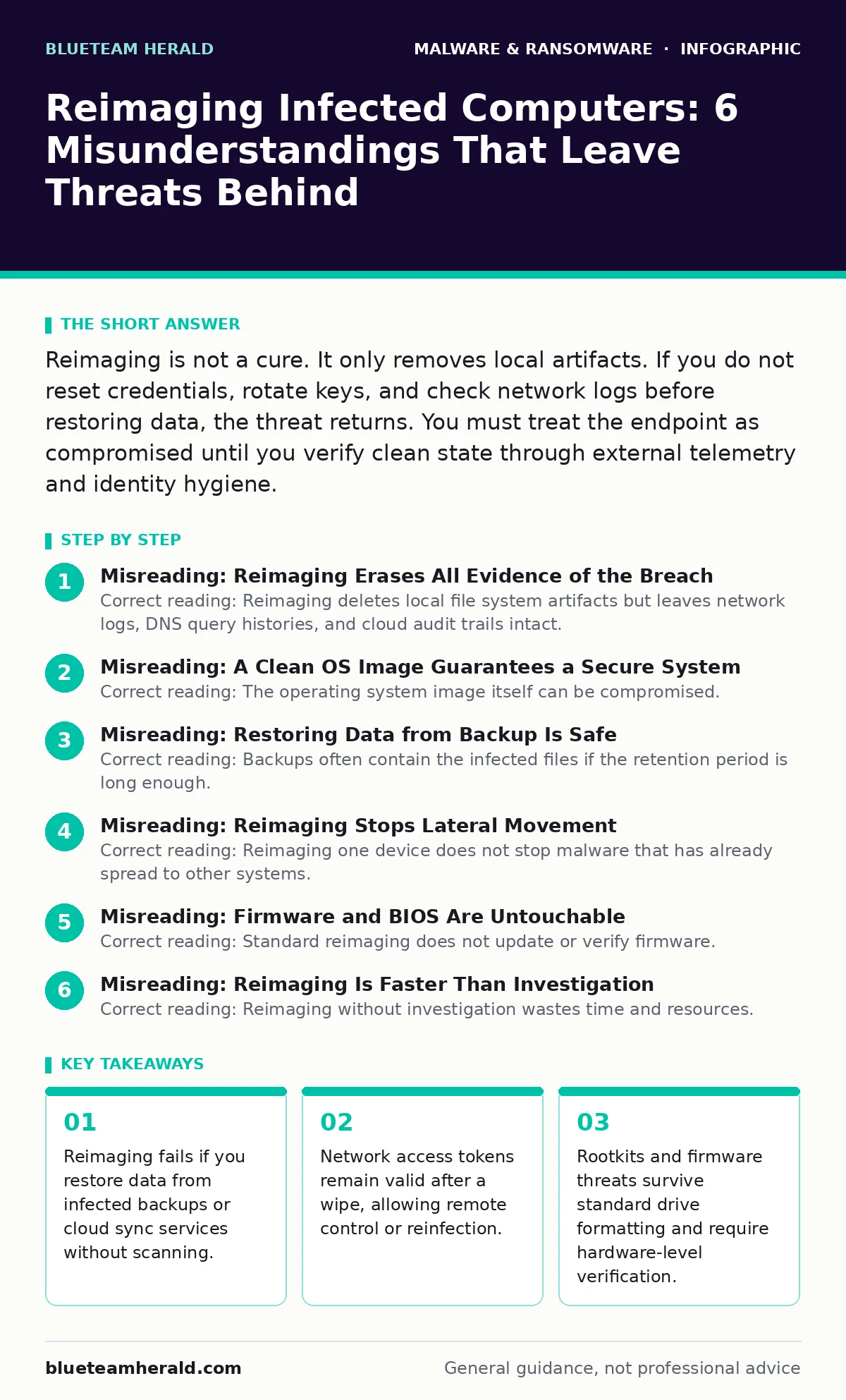
Reimaging is not a cure. It only removes local artifacts. If you do not reset credentials, rotate keys, and check network logs before restoring data, the threat returns. You must treat the endpoint as compromised until you verify clean state through external telemetry and identity hygiene.
Misreading: Reimaging Erases All Evidence of the Breach
Correct reading: Reimaging deletes local file system artifacts but leaves network logs, DNS query histories, and cloud audit trails intact. Malware often communicates with command and control servers before you detect it. These external records prove the compromise occurred. If you only look at the reimaged drive, you miss the timeline of the attack. You also miss indicators that the threat actor already moved laterally to other systems. You must correlate endpoint logs with network telemetry to understand the full scope.
Imagine you wipe a laptop after detecting ransomware. The drive is clean. But the DNS logs show requests to a known malicious domain three days prior. That means other devices might have connected to that same domain. If you do not check those logs, you assume the laptop was the only victim. You leave other systems exposed. The wipe removes the symptom, not the disease vector.
Misreading: A Clean OS Image Guarantees a Secure System
Correct reading: The operating system image itself can be compromised. If you use a recovery partition or installation media that was created while the system was infected, the new install carries the threat. Attackers often patch the boot sector or firmware to persist across reinstalls. This is known as a bootkit. Standard antivirus scans on the running OS may miss these low-level components. You must verify the integrity of your installation source. Use cryptographic hashes to confirm the image matches the vendor’s official release. Do not trust local recovery tools if the main drive was compromised.
Suppose you format the drive and reinstall Windows from a USB stick. That stick was created on a machine that had previously encountered infostealers. The malware hides in the installation files. When you install the OS, you inject the threat directly into the core system. This bypasses firewall rules and application controls. You start with a poisoned foundation. The only safe source is a verified, offline copy of the installation media that has been hashed and checked.
Misreading: Restoring Data from Backup Is Safe
Correct reading: Backups often contain the infected files if the retention period is long enough. Malware like ransomware or spyware may encrypt or modify files days before detection. If your backup runs daily, it captures the corrupted state. Restoring from backup reintroduces the malware. You also risk restoring configuration files that contain malicious scripts or web shells. You must scan backup data before restoration. Treat backups as untrusted until verified. Use immutable backups that cannot be modified by standard user accounts. This prevents attackers from corrupting your recovery source.
Consider a scenario where you restore documents from a cloud sync service. The service synced the encrypted ransomware payload before you noticed the issue. You download the files, thinking they are clean. The ransomware note restores with them. You trigger the payload again. You lose data twice. You must isolate backups from the production network and scan them in a sandbox environment before applying them to live systems.
Misreading: Reimaging Stops Lateral Movement
Correct reading: Reimaging one device does not stop malware that has already spread to other systems. Attackers use stolen credentials to move laterally across the network. If you do not reset passwords and revoke sessions, the threat actor retains access to other endpoints. They can use those systems to reinstall malware on the reimaged machine. You must rotate all credentials associated with the compromised account. This includes email, file shares, and administrative tools. You must also check for new admin accounts or scheduled tasks on other devices. The network is the battleground, not just the disk.
Imagine you wipe a server. You think the problem is solved. But the attacker used that server’s credentials to access a database on another machine. That database still contains the stolen data. The attacker still has valid tokens. They wait for you to reconnect the server to the network. They immediately inject a web shell into a shared folder. The reinfection is instantaneous. You must assume the entire trust boundary is breached.
Misreading: Firmware and BIOS Are Untouchable
Correct reading: Standard reimaging does not update or verify firmware. Firmware sits below the operating system and controls hardware initialization. Attackers can implant rootkits in the BIOS or UEFI. These persist through drive wipes and OS reinstalls. They load before the OS starts, bypassing most security controls. You cannot detect these with standard endpoint protection. You must verify firmware versions and hashes. Use vendor tools to check for unauthorized modifications. Some firmware threats require flashing a known-good version from a verified source. This process is complex and often requires physical access.
Suppose you detect unusual network activity from a machine that has been reimaged three times. The OS is clean. The applications are clean. But the system makes requests to a suspicious IP address during boot. This indicates a firmware-level threat. The malware lives in the motherboard’s memory. It survives every wipe. You must update the BIOS to the latest version from a trusted, offline source. You may need to replace the hardware if the firmware cannot be cleaned.
See also: DNS Rebinding Response: Containment, Recovery and Prevention Steps · Ivanti VPN Warning Signs: Detecting Silent Exploitation
Misreading: Reimaging Is Faster Than Investigation
Correct reading: Reimaging without investigation wastes time and resources. You spend hours formatting and reinstalling. Then you discover the threat is still active because you missed the lateral movement or firmware component. You have to start over. Investigation provides context. It tells you what data was exfiltrated, what credentials were stolen, and what other systems are at risk. This knowledge allows you to contain the threat effectively. It prevents recurrence. You must prioritize containment and evidence preservation over speed. Use extended detection and response (XDR) tools to map the attack path before wiping.
Consider a rushed response where you wipe ten computers in an hour. You save time initially. But you do not check the network logs. You do not rotate passwords. Two days later, the same malware appears on five more machines. You wasted the initial effort. You also lost valuable forensic data that could have helped you identify the entry point. Speed without accuracy leads to repeated failures. Take the time to understand the compromise.
Key takeaways
- Reimaging fails if you restore data from infected backups or cloud sync services without scanning.
- Network access tokens remain valid after a wipe, allowing remote control or reinfection.
- Rootkits and firmware threats survive standard drive formatting and require hardware-level verification.
- Assuming a clean OS image is safe ignores supply chain risks in the recovery media itself.
Frequently asked questions
How long should I wait before reconnecting a reimaged computer to the network?
Wait until you have rotated all associated credentials and verified no lateral movement occurred. Monitor network traffic for anomalies for at least 24 hours before full integration.
Can malware survive a secure erase of an SSD?
Secure erase clears user data but not firmware. If the malware is in the BIOS or SSD controller firmware, it survives the erase. You must update firmware separately.
Should I use the same admin password after reimaging?
No. Always change passwords after a compromise. Reusing passwords allows attackers to regain access if they captured the credentials during the initial breach.
Does reimaging remove infostealers from browsers?
It removes local browser data. But if you sync your browser profile to the cloud, the stolen data or malicious extensions may sync back. Clear cloud sync data before reconnecting.
How this guide was produced: written by the BlueTeam Herald editorial team with AI assistance, checked against the public references listed below, and reviewed when the facts change. See our editorial policy or report an error.