7 PowerShell Mistakes That Leave Your Network Exposed
Administrators often enable PowerShell execution by default, creating a persistent backdoor that attackers exploit without installing any external malware or tools.

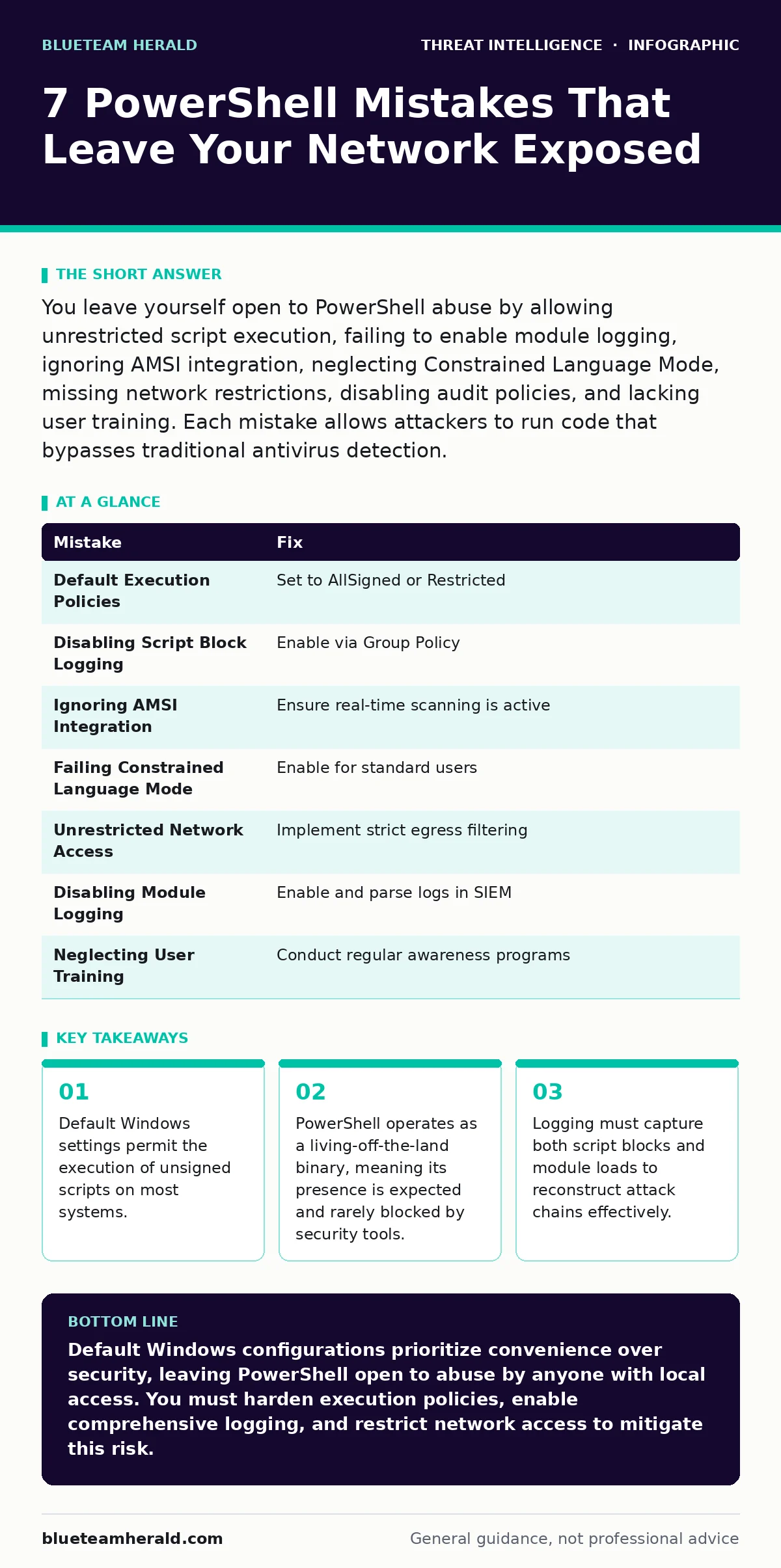
You leave yourself open to PowerShell abuse by allowing unrestricted script execution, failing to enable module logging, ignoring AMSI integration, neglecting Constrained Language Mode, missing network restrictions, disabling audit policies, and lacking user training. Each mistake allows attackers to run code that bypasses traditional antivirus detection.
Mistake 1: Allowing Default Execution Policies
The default execution policy on many Windows installations is set to RemoteSigned or Bypass, which permits local scripts to run without verification. Attackers exploit this setting to execute malicious payloads directly from the command line or within compromised documents. You assume that because the file is local, it is safe.
This assumption fails when an attacker gains initial access through phishing or a remote vulnerability. The script runs with the privileges of the logged-in user, granting immediate access to files and network resources. You do not need to worry about digital signatures for local files, which removes a critical layer of verification. This configuration turns every user workstation into a potential command-and-control node.
Why it hurts: You grant attackers the ability to run arbitrary code immediately upon gaining access. There is no friction to stop the execution. The malware can establish persistence, download additional tools, or begin lateral movement before any security alert triggers. You lose the window for early detection because the activity looks like normal administrative work. The execution policy does not protect against local threats, only against remote scripts that lack proper signing.
The fix: Set the execution policy to AllSigned or Restricted on all endpoints. AllSigned requires every script, even local ones, to be signed by a trusted publisher. Restricted prevents any scripts from running, forcing administrators to use direct commands. You must maintain a centralized signing certificate infrastructure to allow legitimate automation. This adds operational overhead but removes the trivial path for attackers to run unsigned malware.
Mistake 2: Disabling Script Block Logging
Script Block Logging records the contents of PowerShell scripts as they are executed in memory. Many organizations disable this feature because it generates high volume logs that consume storage and processing power. You assume that file integrity monitoring is sufficient. This assumption ignores the fact that attackers often run scripts directly from memory without ever writing them to disk. Without script block logging, you have no visibility into the actual commands being run. You see that PowerShell started, but you cannot see what it did. This blind spot allows attackers to perform reconnaissance, dump credentials, and exfiltrate data without leaving a trace in standard process logs.
Why it hurts: You cannot reconstruct the attack chain. Incident response teams rely on log data to understand the scope of a breach. If the script content is missing, you cannot identify the specific indicators of compromise. You may see anomalous network traffic, but you cannot correlate it to the specific command that generated it. This delays containment and allows the attacker to operate with impunity for extended periods.
The fix: Enable Script Block Logging via Group Policy or registry configuration. Ensure your SIEM ingests and parses these logs. You must configure alerting rules that flag suspicious script patterns, such as base64 decoding or reflection calls. The storage cost is real, but the visibility gain is necessary for modern threat detection. You can reduce noise by filtering for high-risk patterns rather than logging everything indiscriminately.
Mistake 3: Ignoring Antimalware Scan Interface Integration
PowerShell integrates with the Antimalware Scan Interface to allow real-time scanning of scripts before execution. Some administrators disable this integration because it slows down script performance. You prioritize speed over security. This trade-off is dangerous because it removes the last line of defense before a script executes. Malware scanners can detect known malicious patterns in the script content. Without this integration, the script runs immediately, bypassing the antivirus engine. Attackers use this gap to run polymorphic malware that changes its appearance with each execution, evading signature-based detection.
Why it hurts: You allow known malware signatures to execute on your systems. The integration provides a safety net that catches many common threats. Disabling it removes this protection entirely. You rely solely on network controls and user behavior, which are often insufficient to stop sophisticated attacks. The performance impact is usually negligible for most administrative tasks, making this a poor trade-off.
The fix: Ensure AMSI integration is enabled and functioning on all endpoints. Verify that your antivirus solution supports AMSI and is configured to scan PowerShell content. This allows real-time detection of malicious scripts without requiring the script to be written to disk. You gain an additional layer of defense that operates at the application level, complementing network and host-based controls.
Mistake 4: Failing to Implement Constrained Language Mode
Constrained Language Mode restricts the ability to load certain .NET types and call into unmanaged code. Many administrators leave this feature disabled because it can break legacy scripts that rely on advanced .NET features. You assume that restricting access to system tools is enough. This assumption fails when attackers use PowerShell to load malicious .NET assemblies directly into memory.
Without constrained language mode, attackers can bypass application whitelisting and run arbitrary code. They can also interact directly with the Windows API, allowing them to perform actions that are normally restricted. This feature adds a layer of abstraction that makes it harder for attackers to execute low-level operations.
Why it hurts: You allow attackers to bypass application controls and run arbitrary code. Constrained language mode prevents the loading of unsafe types and methods. Without it, attackers can use PowerShell as a full-featured development environment to build and run malware. This increases the complexity of detection and response. You must monitor for attempts to disable this mode, as attackers often try to turn it off during an attack.
The fix: Enable Constrained Language Mode for standard users via Group Policy. This ensures that only approved administrators can run unrestricted PowerShell. You must update legacy scripts to comply with the restrictions. This may require some development effort, but it significantly reduces the attack surface. You should also monitor for attempts to disable this mode, as this is a common indicator of compromise.
Mistake 5: Permitting Unrestricted Network Access
PowerShell can make network connections to remote servers and download content. Many organizations allow unrestricted outbound traffic from workstations. You assume that firewalls block malicious traffic. This assumption fails when attackers use legitimate protocols like HTTPS to communicate with command-and-control servers. PowerShell can encode its traffic to look like normal web browsing. Without network restrictions, attackers can exfiltrate data and receive instructions without triggering alerts. You must restrict outbound traffic to known and trusted destinations. This limits the ability of attackers to communicate with external servers.
Why it hurts: You allow attackers to maintain persistent access and exfiltrate data. Unrestricted network access makes it easy for attackers to blend in with normal traffic. You cannot distinguish between legitimate web browsing and malicious command-and-control communication. This complicates detection and response. You must implement strict egress filtering to limit the damage.
The fix: Implement strict egress filtering on your network. Block outbound traffic to unknown or untrusted destinations. Allow only specific ports and protocols that are required for business operations. You should also monitor for unusual network patterns, such as large data transfers or connections to rare ports. This reduces the ability of attackers to communicate with external servers and limits the scope of a breach.
See also: What Is Network Scanning: Mechanisms, Risks, and Detection · What Is Canary Tokens: How Bait Files Alert You to Data Theft
Mistake 6: Disabling PowerShell Module Logging
Module logging records the load and unload events of PowerShell modules. Many administrators disable this feature because it generates significant log volume. You assume that script block logging is sufficient. This assumption ignores the fact that attackers often use legitimate modules to perform malicious actions. Without module logging, you cannot see which modules were loaded. This makes it difficult to detect the use of living-off-the-land tools. You may see suspicious activity, but you cannot identify the specific module that caused it. This blind spot allows attackers to operate undetected for extended periods.
Why it hurts: You lose visibility into the use of legitimate modules for malicious purposes. Attackers often use standard modules to perform reconnaissance or lateral movement. Without module logging, you cannot detect these activities. You rely on script block logging, which may not capture all actions. This increases the complexity of detection and response. You must enable module logging to gain complete visibility.
The fix: Enable PowerShell Module Logging via Group Policy. Ensure your SIEM ingests and parses these logs. You should create alerting rules that flag the use of high-risk modules. This allows you to detect suspicious activity early. You must balance the log volume with the need for visibility. Filtering for high-risk modules can reduce noise while maintaining security.
Mistake 7: Neglecting User Awareness and Training
Users often run PowerShell scripts provided by attackers via email or removable media. Many organizations focus on technical controls and neglect user training. You assume that technical controls are sufficient. This assumption fails when users are tricked into running malicious scripts. Social engineering remains a primary vector for initial access. Without proper training, users cannot identify suspicious scripts or commands. You must educate users on the risks of running unknown scripts. This reduces the likelihood of successful phishing attacks.
Why it hurts: You rely on technical controls that can be bypassed by human error. Users are the first line of defense. Without proper training, they cannot identify social engineering attempts. This increases the risk of initial access. You must invest in regular training and awareness programs. This reduces the likelihood of successful attacks and improves overall security posture.
The fix: Implement regular user awareness training that covers PowerShell risks. Teach users to identify suspicious scripts and commands. Encourage users to report suspicious activity. You should also simulate phishing attacks to test user awareness. This helps identify gaps in training and improve effectiveness.
| Mistake | Fix |
|---|---|
| Default Execution Policies | Set to AllSigned or Restricted |
| Disabling Script Block Logging | Enable via Group Policy |
| Ignoring AMSI Integration | Ensure real-time scanning is active |
| Failing Constrained Language Mode | Enable for standard users |
| Unrestricted Network Access | Implement strict egress filtering |
| Disabling Module Logging | Enable and parse logs in SIEM |
| Neglecting User Training | Conduct regular awareness programs |
Key takeaways
- Default Windows settings permit the execution of unsigned scripts on most systems.
- PowerShell operates as a living-off-the-land binary, meaning its presence is expected and rarely blocked by security tools.
- Logging must capture both script blocks and module loads to reconstruct attack chains effectively.
Default Windows configurations prioritize convenience over security, leaving PowerShell open to abuse by anyone with local access. You must harden execution policies, enable comprehensive logging, and restrict network access to mitigate this risk.
Frequently asked questions
Does PowerShell logging slow down the system?
Script block and module logging have a minimal performance impact on modern hardware. The storage and processing overhead for log analysis is more significant than the runtime cost.
Can attackers disable logging during an attack?
Attackers with administrative privileges can disable logging. You should monitor for changes to logging configurations and alert on any modifications to Group Policy or registry keys.
Is Constrained Language Mode compatible with all scripts?
No, some legacy scripts that use advanced .NET features may fail. You must test and update scripts to ensure compatibility before enforcing this mode organization-wide.
How do I detect encoded PowerShell commands?
You can create SIEM rules that flag the use of the -EncodedCommand parameter or base64 decoding functions. These are common indicators of malicious activity.
How this guide was produced: written by the BlueTeam Herald editorial team with AI assistance, checked against the public references listed below, and reviewed when the facts change. See our editorial policy or report an error.