Combo List Mistakes: 7 Errors That Leak Your Credentials
Attackers combine usernames from public sources with leaked passwords to bypass single-factor authentication, making username exposure as dangerous as password theft.

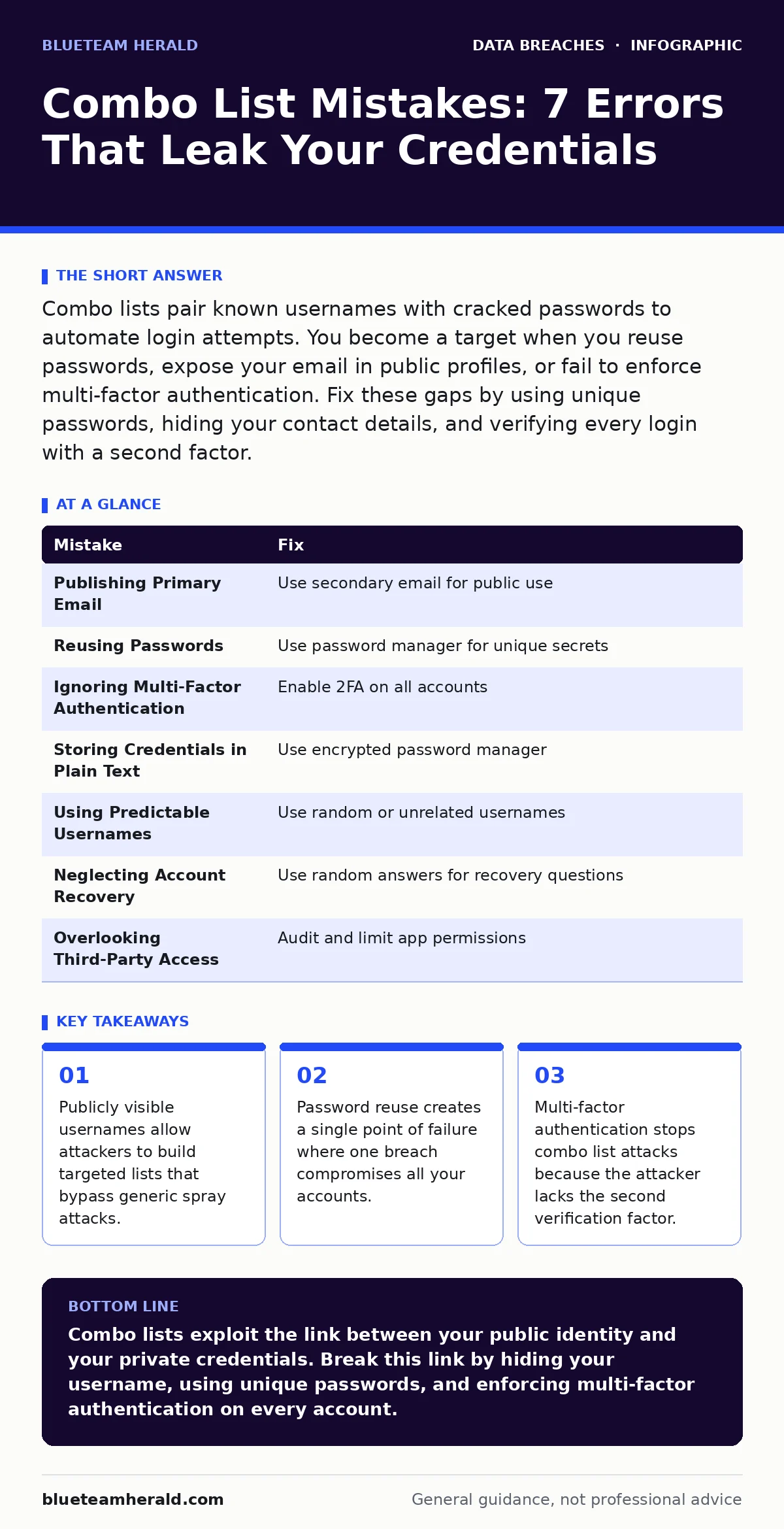
Combo lists pair known usernames with cracked passwords to automate login attempts. You become a target when you reuse passwords, expose your email in public profiles, or fail to enforce multi-factor authentication. Fix these gaps by using unique passwords, hiding your contact details, and verifying every login with a second factor.
Mistake 1: Publishing Your Primary Email Address
Your primary email address often serves as your username for banking, social media, and corporate systems. When you publish this address on public profiles, job boards, or forum signatures, you hand attackers the first half of the credential pair. Attackers scrape these public records to build targeted lists.
Why it hurts:
Combo lists are more effective than random password sprays because they target specific identities. An attacker who knows your email can focus computational power on cracking your specific password hash rather than guessing millions of random emails. This targeted approach increases the success rate significantly.
The fix:
Use a secondary email address for public interactions and low-risk sign-ups. Keep your primary email address private and accessible only through secure, direct communication channels. Review your online presence regularly to remove any exposed contact information. See our guide on oversharing on social media for techniques to minimize your digital footprint.
Mistake 2: Reusing Passwords Across Services
Using the same password for multiple accounts creates a chain reaction of compromise. If one service suffers a data breach and leaks its database, attackers immediately test that password on other popular platforms. This behavior turns a single incident into a total identity takeover.
Why it hurts:
Credential stuffing attacks rely on this exact behavior. Attackers automate login attempts using stolen credentials from one site against others. If your password matches, they gain instant access. You lose control over every account that shares that secret, including sensitive financial or medical portals.
The fix:
Use a password manager to generate and store unique, complex passwords for every account. This ensures that a breach at one vendor does not compromise your other identities. Never write passwords down or store them in unencrypted files. Review our secrets management guide for best practices on handling sensitive credentials securely.
Mistake 3: Ignoring Multi-Factor Authentication
Many users believe a strong password is sufficient protection. This assumption fails against combo lists because the attacker already possesses the correct password. Without a second factor, the system accepts the login as legitimate, granting the attacker full access to your account.
Why it hurts:
Combo lists bypass the knowledge factor of authentication. If the attacker has the correct username and password, the system cannot distinguish between you and them. You lose your account instantly, and the attacker can reset recovery options, lock you out, or exfiltrate data before you notice.
The fix:
Enable multi-factor authentication on every account that supports it. Prefer hardware security keys or authenticator apps over SMS codes, which can be intercepted. This adds a possession factor that the attacker cannot replicate with just a stolen password. Check our email account compromise guide for additional steps to secure communication channels.
Mistake 4: Storing Credentials in Plain Text
Some users keep spreadsheets or text files with login details for convenience. If these files are backed up to cloud storage or stored on a shared drive, they become a single source of truth for attackers. A single file leak exposes every password in one go.
Why it hurts:
A compromised file provides attackers with a ready-made combo list for all your accounts. They do not need to crack hashes or guess passwords. This eliminates the time and effort required for brute-force attacks, allowing immediate access to your most sensitive systems and personal data.
The fix:
Delete any plain-text files containing passwords immediately. Migrate all credentials to a reputable password manager that encrypts data locally. Ensure the master password protecting the manager is unique and strong. Refer to the 3-2-1 backup rule for secure data redundancy strategies that do not compromise credential security.
Mistake 5: Using Predictable Username Patterns
Many services default to using your first name, last name, or email as the username. Attackers exploit this consistency to guess usernames when the email is not directly visible. Predictable patterns allow them to construct comprehensive lists without direct exposure.
Why it hurts:
If an attacker can guess your username, they only need to crack your password. This reduces the complexity of the attack significantly. Common patterns like "FirstName_LastName" or "Initials_Year" are easily generated by automated tools, making your accounts vulnerable even if your email is private.
The fix:
Use random or unrelated usernames where the service allows. Avoid using your real name or email address as the public identifier. This breaks the link between your identity and your account, forcing attackers to guess both the username and password, which is computationally difficult.
See also: Database Security FAQ: Protecting Records from Internal and External Threats · Stop Oversharing on Social Media: A Prevention Checklist
Mistake 6: Neglecting Account Recovery Options
Weak or publicly accessible recovery questions are a backdoor into your account. Questions like "What is your mother's maiden name?" or "What was your first car?" often have answers available on social media or public records. Attackers use these to reset passwords after gaining the initial credential pair.
Why it hurts:
Even if you change your password, an attacker with the correct recovery answers can reset it again. This allows them to maintain persistent access. You may believe you have secured the account, but the attacker retains control through the recovery mechanism, leading to long-term data theft.
The fix:
Treat recovery questions as passwords. Use a password manager to generate random answers and store them securely. Never use factual information that can be researched. Enable additional recovery methods like backup codes or trusted devices. See our employee offboarding security guide for insights on revoking access promptly.
Mistake 7: Overlooking Third-Party Access
Granting third-party applications broad permissions to your accounts creates additional entry points. If a connected app is compromised or its database leaked, your credentials may be exposed. These leaks often go unnoticed until the attacker uses the stolen access to pivot into your primary account.
Why it hurts:
You lose visibility into who has access to your data. A breach at a minor service can compromise your primary identity if permissions are too broad. Attackers exploit these connections to steal session tokens or reset credentials, bypassing standard security controls.
The fix:
Regularly audit connected applications and revoke access for unused services. Limit permissions to the minimum required for functionality. Monitor for unauthorized logins and session anomalies. Refer to our stolen session tokens guide for techniques to detect and mitigate session hijacking attempts.
| Mistake | Fix |
|---|---|
| Publishing Primary Email | Use secondary email for public use |
| Reusing Passwords | Use password manager for unique secrets |
| Ignoring Multi-Factor Authentication | Enable 2FA on all accounts |
| Storing Credentials in Plain Text | Use encrypted password manager |
| Using Predictable Usernames | Use random or unrelated usernames |
| Neglecting Account Recovery | Use random answers for recovery questions |
| Overlooking Third-Party Access | Audit and limit app permissions |
Key takeaways
- Publicly visible usernames allow attackers to build targeted lists that bypass generic spray attacks.
- Password reuse creates a single point of failure where one breach compromises all your accounts.
- Multi-factor authentication stops combo list attacks because the attacker lacks the second verification factor.
Combo lists exploit the link between your public identity and your private credentials. Break this link by hiding your username, using unique passwords, and enforcing multi-factor authentication on every account.
Frequently asked questions
How do attackers get combo lists?
Attackers aggregate username and password pairs from various data breaches, combining them into lists that pair specific identities with their leaked credentials.
Can I use the same password if I enable 2FA?
While 2FA adds security, reusing passwords remains risky. If an attacker bypasses 2FA or the service does not support it, your other accounts are compromised.
Are combo lists only for large companies?
No. Combo lists target any individual or organization with publicly exposed usernames and reused passwords, making personal accounts just as vulnerable.
How often should I change my passwords?
Change passwords immediately if you suspect a breach. Otherwise, focus on uniqueness and strength rather than frequent rotation, which often leads to weaker choices.
How this guide was produced: written by the BlueTeam Herald editorial team with AI assistance, checked against the public references listed below, and reviewed when the facts change. See our editorial policy or report an error.